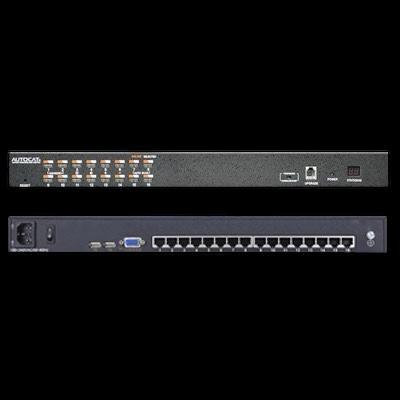
Rack Mount KVM Switch (CAT5)
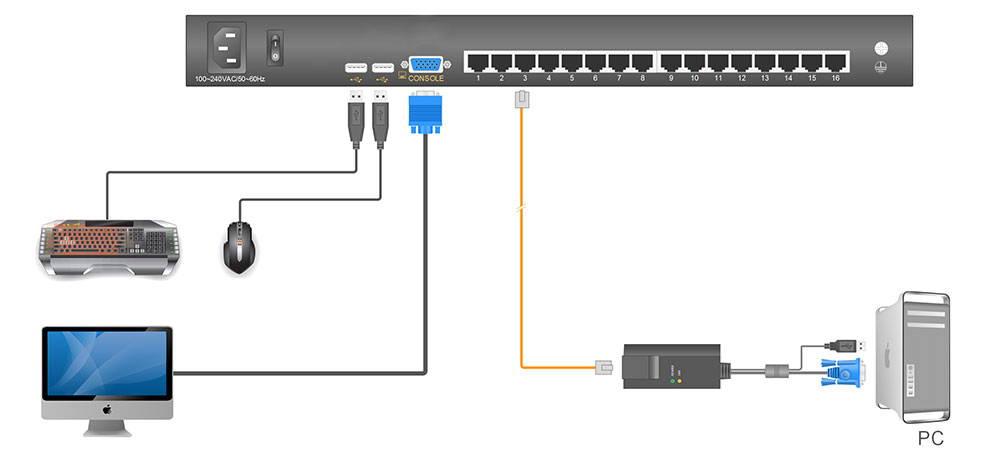
SINETIC Rack Mount KVM Switch (CAT5) switch allows access and control up to 8/16/32 computers from a single console (keyboard, mouse and monitor). As many as 256/512/1024 computers can be controlled from a single keyboard-mouse console by cascading to another 31 additional switches. The KVM switch supports USB connections for the console and computers, RJ-45 connector and CAT5e/6 cable are used to link to the computers.
KVM-RK16C0
1U 19” Rack Mount 16 Ports CAT5 KVM Switch


Introduction       Specification         Ordering Information        Datasheet
Features
⦁ 1U Design-Occupies only 1U of the rack space
⦁ Fit for standard 19” rack mounting
⦁ Standard RJ-45 connector-Connect to a server or KVM switch via a standard RJ-45 connector with CAT 5e/6 cable
⦁ Convenient computer switching via front panel pushbuttons, keyboard hotkeys, OSD (On-Screen Display)
⦁ Auto scan feature for monitoring user-selected computers
⦁ Broadcast mode--operations simultaneously performed on all selected computers
⦁ Hot pluggable --add or remove computers without having to power down the switch
⦁ Quickly select your computer by naming the server or inputting SN number of the server
⦁  Resolution is up to 1920x1080@60Hz
⦁  Directly access and control up to 8 servers with single KVM-RK16C0
⦁ By cascading to 15 additional switches, as many as 256 computers can be controlled from single KVM-RK16C0
⦁ Two level password security--only authorized users view and control computers; up to four users and an administrator with a separate profile for each
⦁ Multi-platform Support-Compatible with Windows, Sun, Unix and Linux
⦁ Supports server form Lenovo, HUA WEI, HP, IBM, Cisco and Dell, etc..

Introduction
The KVM-RK08-C0 CAT5 KVM Switch allows access and control up to 16 computers from a single console (keyboard, mouse, and monitor). As many as 256 computers can be controlled from a single keyboard-mouse console by cascading to another 31 additional switches. The KVM switch supports USB connections for the console and computers, RJ-45 connectors and CAT 5e/6 cable are used to link to the computers.
Specification
Connections
Direct
• 16
Max
• 512
Port Selection
• Front panel pushbuttons, keyboard hotkeys, OSD (On-Screen Display)
Console Monitor
• 1x HDB-15 Female(blue)
Console Keyboard & Mouse
• 2 x  USB TYPE A
KVM port (RJ45)
• 8
Upgrading switch
• 1x  RJ11 Female
Power
• 3-Prong AC socket
Switch
Port Selecting

• 8x  buttons
Reset
• 1x  touch-button
Upgrading switch
• 1x  pull switch
Power
• 1x  rocker switch
Indicating LEDs
• Online - 16 (green), Selected - 16 (orange), Power - 1(blue)
Cascading/port display
• 2x 7- Segment (orange)
I/R Value
• 100V-240V AC , 50
~60Hz , <1.5A
Video Signal
• 1920x1080@60Hz
Power Consumption
• 5W
Emulation
• Keyboard/Mouse
• PS/2 , USB
Mechanical & Environment
Operation temperature
• 0°C to 40°C
Storage temperature
• 20°C to 60°C
Relative humidity
• 0% to 80% (Non-Condensing)
Material
• SECC
Weight
• 2.7kg Net
Dimension
• 433mm x 171mm x 44.5mm
Packaging
• 512mm x 152mm x 252mm
Ordering Information
KVM-RK16-C0
1U 19" Rack Mount 16 Port CAT5 KVM Switch

Optional
Dongle-1200U
Adapter for CAT5 KVM Consoles (USB)
SINETIC Technologies Pte Ltd
 
Address: 22 Sin Ming Lane #06-76 Midview City Singapore 573969
Phone: +65-62788380
Email: info@sinetic.com
© 2026 SINETIC. All rights reserved. Information published on sinetic.com is subject to change without notice. | Privacy Policy |